Devices
A device is a board that belongs to your company — a board you bought from PRIZM, or your own hardware running PRIZM firmware. Devices is the top-level sidebar item where you register them and watch them.
Registering a device is what puts it in your company. Until you do, PRIZM Cloud does not know the board exists: it cannot appear in the device list, it cannot be added to a bundle, and it cannot run an application.
What a purchased device already has
A board bought from PRIZM arrives with its identity and certificates already flashed. There is nothing to generate and nothing to flash — you only need to tell PRIZM Cloud that the board is yours.
Whether it can reach the cloud on its own depends on how it connects:
- Cellular — the board connects unattended as soon as it has power and coverage. Registering is the only step. Its SIM carries a 500MB monthly data allowance that tops itself up automatically when it runs low, as long as the top-up fits under your Max Credits.
- Wi-Fi — the board still needs your network credentials. Hand them over in Soft AP mode before or after registering. Skip this and the device registers correctly, then stays Offline indefinitely.
Flashing PRIZM firmware onto your own hardware works differently — you generate the device in PRIZM Cloud first and write its ID and certificates to the board yourself. See Bring your own hardware.
Register a device
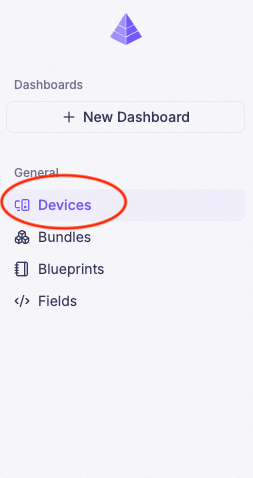
Click Devices in the sidebar
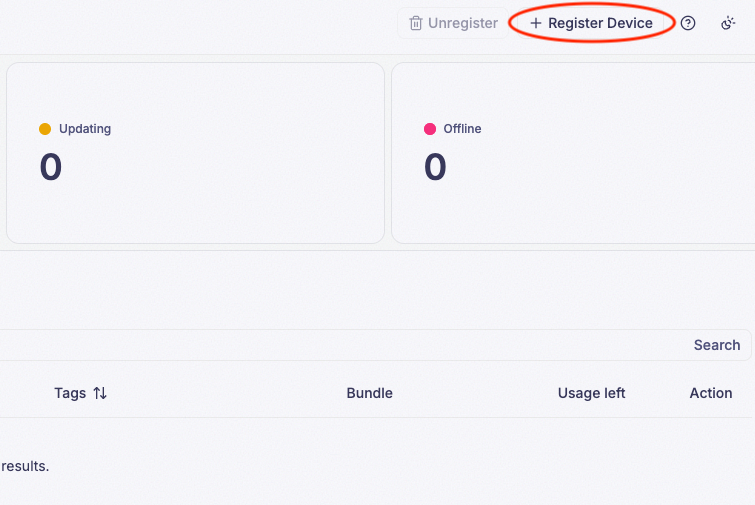
Click Register Device
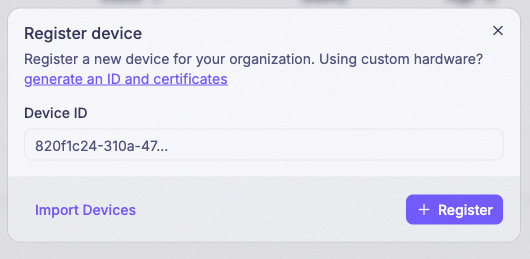
Enter the Device ID printed on the device and click Register
The Device ID is the board’s permanent identity. It is printed on the device itself, and it is the same ID used to derive the Soft AP network name and password.
Choose a Bundle (optional)
If a bundle already exists, the form also lets you pick one here instead of leaving it on No Bundle. Doing so registers the device and adds it to that bundle in a single action, so you can skip Add a device to a bundle entirely. If the bundle already has an application deployed, the device starts running it right away.

Registering many devices at once
Click Import Devices on the same dialog to register a batch of devices from a CSV file instead of
one at a time. The file needs a single device_id column, with one Device ID per row:
| device_id |
|---|
| 1ab1ab1a-1ab1-1ab1-1ab1-1ab1ab1ab1ab |
| 2cd2cd2c-2cd2-2cd2-2cd2-2cd2cd2cd2cd |
Any row whose value isn’t a valid Device ID is skipped, so a stray blank line won’t break the import. Devices registered this way aren’t added to a bundle — do that afterward in Add a device to a bundle.

A Device ID can only be registered once. If the board is already registered — to your company or to anyone else’s — registration fails. A board that changes hands must be removed from the old company first.
A registered device does nothing until it is in a bundle
Registering a device makes it visible and lets it report its connection status. It does not make it run anything. Applications are deployed to bundles, never to individual devices, so your next step is to put the device in one.
See Bundles for why that is required and how to do it.
What a connected device costs
There is no limit on how many devices you can register. Connectivity, however, is metered: a device consumes 11 credits every 5 minutes while it is Online or Running — roughly 3,168 credits per device per day. A device that is Offline consumes none.
Every message a device sends costs credits too, charged by its size and multiplied by your data retention window — up to 40 times as much at 1 year as at 7 days. See Device data.
Your current usage and limit are on Settings → Billing.
When your company reaches its Max Credits, connected devices disconnect and stop reporting until the Reset Date, and any message a device sends is rejected and lost. There is no LED symptom and no network symptom — the fleet simply goes quiet. If every device goes offline at once, check billing before you check anything else.
Getting told when a device goes offline
PRIZM Cloud can email the company Owner whenever a device goes offline. It is a single company-wide switch — Notify when device goes offline on Settings → Company & Employees — and it is off by default.
It emails the Owner and nobody else, and it fires on nothing but a device going offline. For anything conditional, or to reach someone other than the Owner, use an alert instead.
Removing a device
A device can be removed from your company at any time. Removing it frees its Device ID, so the board can be registered again — by you, or by whoever you pass it on to. This is the supported way to transfer or resell hardware.
Data the device already recorded remains available until the data retention window expires, as it does for any device field.
Who can register a device
Registering, editing, and removing devices requires the Owner or Admin role. Employees with the User role have read-only access and will not see these actions.