Billing & Plan
The Billing & Plan tab shows what your company has spent this cycle, how much of it was free, and how long your data is kept. It is also where the two controls that change those things live — both Owner only.
Credits
Credits are the usage currency. Five things spend them:
- Device data — every message a device sends is charged by its size, multiplied by your data retention window. See Device data below.
- Device connectivity — a device consumes 11 credits every 5 minutes while it is Online or Running. A device that is Offline consumes none.
- Alert actions — 10,000 credits for every action that completes successfully, whatever its type: Email, SMS, HTTP Webhook, and in-app Notification all cost the same. An action that fails is not charged. See Alerts.
- Location Tracking — 1,000 credits for every location successfully delivered to a device. See Location Tracking.
- Cellular Top-up — a SIM data refill for cellular devices, automatic or manual. See Cellular Top-up below.
Max Credits is a kill switch, not a budget alert. When your usage reaches it, credit-consuming actions stop until the Reset Date — including device connectivity, so connected devices disconnect and stop reporting, and any message a device sends is rejected — not stored and not queued, so that data is lost. There is no LED symptom and no network symptom; the fleet simply goes quiet. If every device goes offline at once, check this tab before you check anything else.
An alert is all-or-nothing on credits. Before an alert runs, PRIZM checks that your company can afford every one of its actions. If it can’t, the whole alert is blocked — no action is sent, not even the ones you could have afforded. An alert with four actions needs 40,000 credits of headroom under Max Credits to send anything at all.
Device data
Every message a device sends is charged by its size: 1 credit per full 1,024 bytes, and never less than 1. A 300-byte message costs 1 credit, a 2,047-byte message still costs 1, and a 2,048-byte message costs 2.
A message is charged even if PRIZM Cloud drops it instead of storing it, for example because it is timestamped more than 7 days before it arrives. See Device Fields.
That charge is then multiplied by your data retention window:
| Retention | Multiplier | A 300-byte message costs |
|---|---|---|
| 7 days | ×1 | 1 credit |
| 30 days | ×3 | 3 credits |
| 90 days | ×10 | 10 credits |
| 180 days | ×20 | 20 credits |
| 1 year | ×40 | 40 credits |
Retention is the biggest lever on your bill. One device sending one small message a minute spends 1,440 credits a day at 7 days — and 57,600 a day at 1 year, about eighteen times its connectivity charge. Over a 30-day cycle that single device spends 1,728,000 credits, more than the whole free allowance on its own.
Data charges are recorded in the $SYS/credits/usage system field, so they appear in the Credits usage
per day chart, and they count toward Max Credits like everything else. Once
you reach it, every message is rejected.
Cellular Top-up
A cellular device’s SIM carries a 500MB monthly data allowance. When its remaining data drops to 20% (100MB), PRIZM tops it up automatically to keep the device from going offline.
Each top-up spends 1,500,000 credits. B2B/ADMIN-managed companies are not charged. You get an in-app notification and an email titled “[PRIZM] Top-Up Successful” when it happens.
A top-up fails if it would take you past Max Credits. PRIZM does not check for a payment method — only whether another 1,500,000 credits fit under your cap. At the default Max Credits of 1,143,000 they never do, so every top-up fails until you raise it. A paying company close to its cap fails the same way.
When a top-up fails, the company’s Owner gets an in-app notification and an email saying the top-up failed. The device keeps running on the data it has left, then goes offline once the SIM’s allowance runs out. To recover, raise Max Credits, then top the device up manually.
Manual top-up
An Owner can top up a cellular device by hand from the device table. Each device can be topped up manually at most once every 15 minutes.
The free allowance
Every billing cycle includes 1,143,000 credits at no cost. Only usage beyond that is billable.
There is no limit on how many devices you register — a device is metered only for being connected and for the data it sends, so it costs nothing while it is Offline. Generating a device for your own hardware is different: you can generate one per billing cycle, and the button stays disabled until your Reset Date.
To work out what your own fleet needs, and what anything beyond the allowance costs, use the pricing calculator .
What’s on the tab
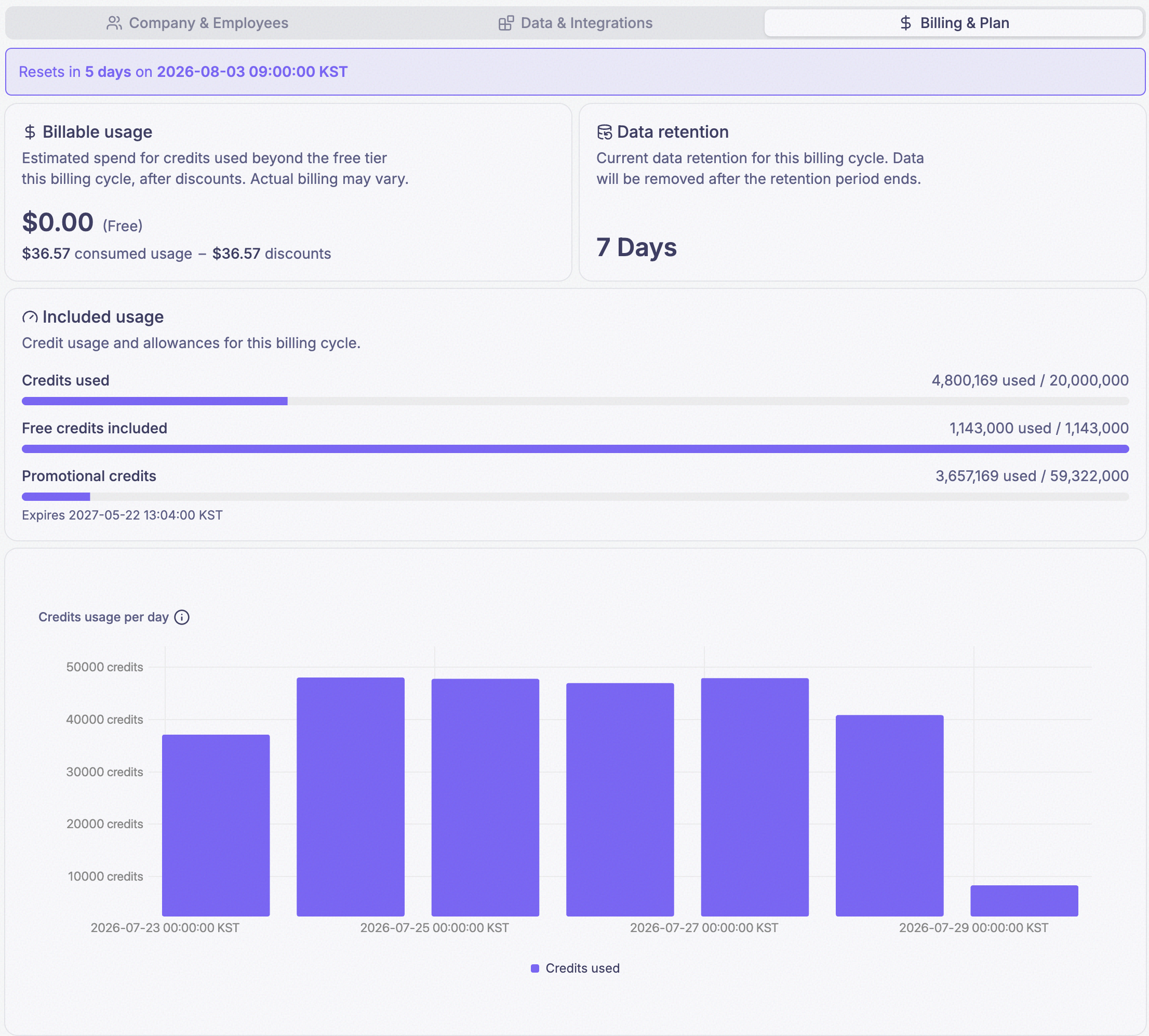
- The reset banner — how many days until your credit counter returns to zero, and the date it happens. The Reset Date advances 30 days each time it resets.
- Billable usage — an estimate of what you have spent beyond the free allowance this cycle, after any discounts. It is an estimate; the card says as much.
- Data retention — your current window. See below.
- Included usage — three meters: Credits used against your limit, Free credits included against the allowance above, and Promotional credits with their expiry date, if you have any.
- Credits usage per day — a bar chart of the last 7 days. It is a real
widget reading the
$SYS/credits/usagesystem field, so it behaves like any other chart on a dashboard.
Set Usage Limits
Click Set Usage Limits in the page header

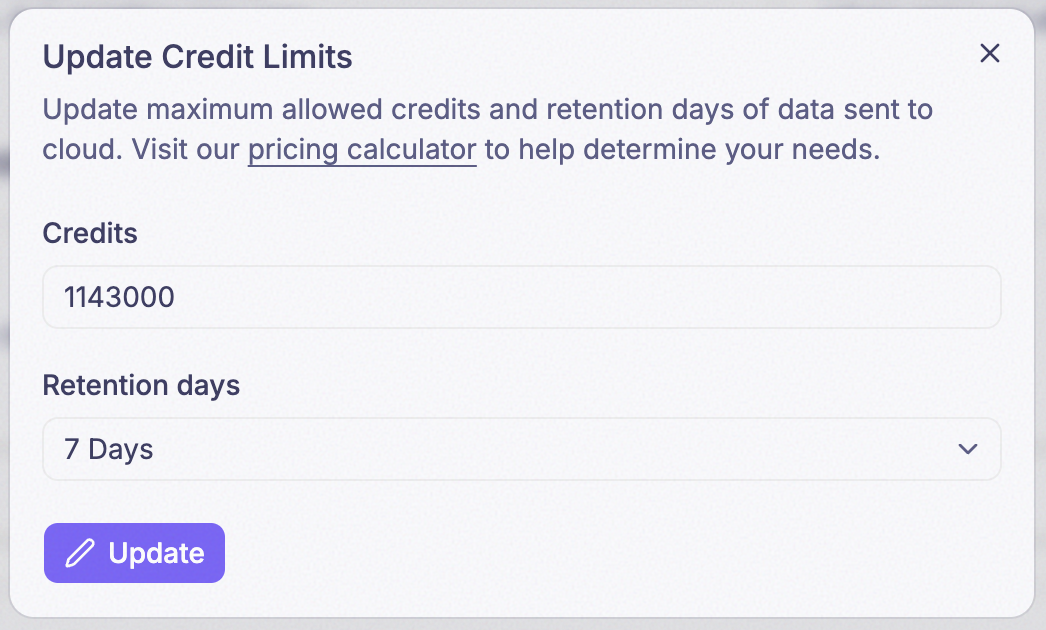
Set Credits and Retention days in the Update Credit Limits dialog, then click Update
- Credits — your new Max Credits, the kill switch above.
- Retention days — your new Data Retention window: 7 days, 30 days, 90 days, 180 days, or 1 year. Every window longer than 7 days multiplies the cost of every message — up to ×40 at 1 year; see Device data. See also What happens to data you already have below before you shorten or lengthen this.
Changing Retention days does not retag data you already have. Each stored value keeps the retention window it was recorded under, so data effectively sits in separate buckets per Retention days setting. After you change the setting, older data recorded under the previous window still expires on its own original schedule — not the new one. See What happens to data you already have below.
Owner only. An Admin cannot open it, which means an Admin cannot raise the limit even while the fleet is about to hit it.
Use the pricing calculator to work out what to set.
Free-tier companies with no payment method on file, and other accounts PRIZM manages directly for them (B2B/ADMIN), cannot raise either value themselves. For them the dialog opens as Update Retention Days instead of Set Usage Limits, and there is no Credits field at all — only PRIZM can raise their credit limit. See During a proof-of-concept your tab looks different.
Data retention
Data retention is how long recorded field values are kept. Five windows are available: 7 days, 30 days, 90 days, 180 days, and 1 year. Change it in the Update Credit Limits dialog, opened with the Set Usage Limits button above.
The window you pick sets what every message costs. Lengthening retention multiplies the credits each new message spends — ×3 at 30 days, up to ×40 at 1 year. See Device data before you change it.
Retention is the ceiling on every way of reading data back — dashboards, webhooks, the REST API, and CSV export can none of them show a value that has expired.
What happens to data you already have
Each value keeps the retention it had when it arrived, and changing the setting never revisits it. So neither direction touches data you already have:
- Shortening retention destroys nothing. Values recorded under a 90-day window still last 90 days.
- Lengthening retention recovers nothing. Going from 7 days to a year does not bring back last month — it applies only to values that arrive from now on, and each of those costs 40 times as much.
Billing Portal
The Billing Portal button in the page header opens PRIZM’s billing provider in a new tab, where you manage your payment method, download invoices, and change your plan. Owner only.
Plan changes are made there, not in Settings.
During a proof-of-concept your tab looks different
If PRIZM set your credit limit for you — which normally happens during a proof-of-concept, for free-tier companies with no payment method on file, and for other accounts PRIZM manages directly (B2B/ADMIN) — the tab is reduced: there is no Billable usage card and no Billing Portal button. The header button also changes from Set Usage Limits to Update Retention Days, and the dialog it opens has no Credits field at all — only Retention days. If that describes what you are looking at, your credit limit is managed for you; talk to your PRIZM contact to change it.
Who can change billing
Both Set Usage Limits and Billing Portal require the Owner role. An Admin can read this tab but change nothing on it, and employees with the User role cannot reach it at all. Full table: Who can do what.